
What is XM?
XM Group is a group of regulated entities providing online trading services since 2009. XM is their trading name. The service launched as “Trading Point of Financial Instruments” and the XM rebranding happened in 2013. Since the rebrand, the service has become one of the biggest retail forex and CFD brokers in the world, with clients in 190+ countries.
The group operates via multiple entities. Depending on your country of residence, you might be trading under a different legal entity. These entities are:
- Trading Point of Financial Instruments Ltd (regulated by CySEC in Cyprus)
- Trading Point of Financial Instruments Pty Ltd (regulated by ASIC in Australia)
- XM Global Limited (regulated by FSC in Belize)
- And several other entities regulated by the DFSA (Dubai), FSCA (South Africa), and FSA (Seychelles)
The driving force behind XM’s success has been a singular focus on accessibility. How? Well, a $5 minimum deposit, wide language support, and research-backed, highly localized services in dozens of countries sure makes it a nice deal for more people. XM’s focus is on beginner-to-intermediate level traders looking for a dependable and well-regulated platform that doesn’t come with insanely high capital requirements. And that focus has been translated into action pretty well. As per the group’s data, XM processes upward of 2.4 billion trades a year with over 10 million clients all over the globe.
XM offers various account types for different types of customers. It offers markets for forex, precious metals, equity indices, cryptocurrencies, thematic indices, stocks, turbo stocks, commodities, shares, and energies.
How to Open an XM Account?
Setting Up an Account
Follow the link and you will land on the main page. There, you can click on Get Started. This is the very first step.
- The form here will ask you for your country of residence, email address, and a password.
- Once entered, click on Register.
- An email will go to your address.
- Click on the green Verify Email button.
- Now, your account will be set up and you will land on your dashboard.
Verify Your Account
The next step is to verify your account. Click on the Verify Account button.
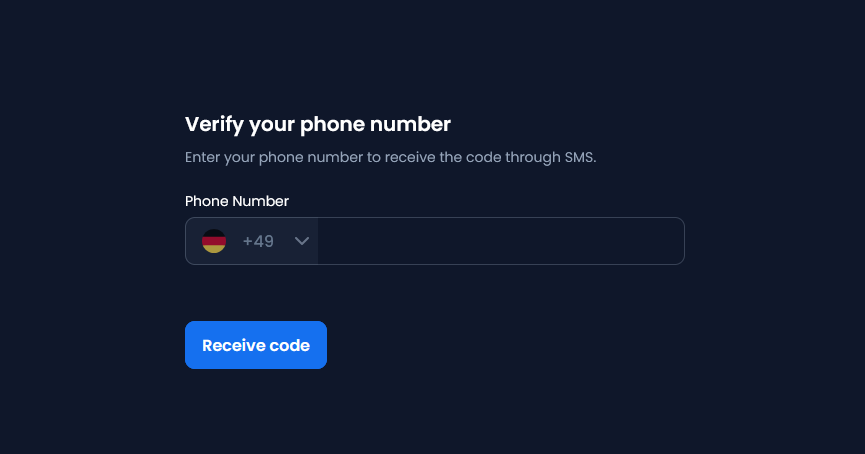
Once you verify with the code, a new form will open up. Here, enter correct details including your full name and date of birth.
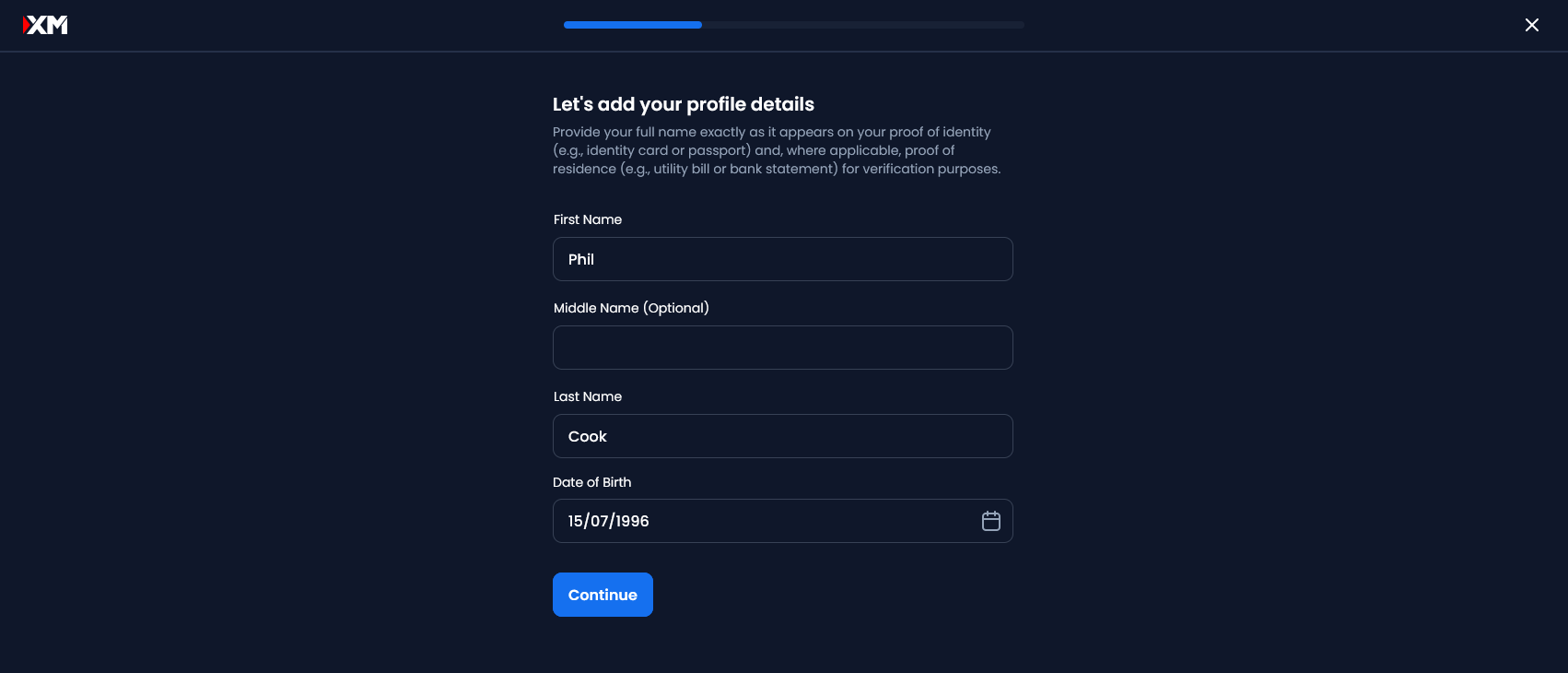
After this, you will have a couple more screens. Enter your address (choose from maps entries), clarify if you’ve had any previous trading experience.
Now comes the major step. Here, you will need to verify your identity. Upload your ID here. It can be your passport or driver’s license, for example. A selfie step might be required next. And if you’re on a device without a camera (for example, a PC without a webcam), you will be given a QR code to scan. Scan it from your phone.
Note: The camera’s shutter will click automatically with a sound. Just frame your head inside the oval on the screen. The next step? Depositing.
Depositing
Your ID verification will take some time, and you can make your deposit once it’s done. You will get notified by email.
Based on your country, you will find the payment methods available to you. Cryptocurrencies should be available for everyone. E-wallets, bank transfers, and local payment methods are also available depending on the country.
XM keeps your funds in segregated European accounts with tier 1 banking institutions.
How Good is XM?
The good thing about XM is that it keeps things simple. The dashboard has no clutter, the UI is super-friendly, and there’s a clear progression system. You know your level, you can take a quick look at your portfolio, and there are a couple of handy sections right on your dashboard:
- Top Gainers, Top Losers, Top Long, Top Short
- Top Stories
Both can be instrumental in shaping your idea for the next trade.
Also, XM is one of the leading brokers in the world. They have paid billions in bonuses to traders with their year-round bonuses to boost your capital. On top of that, the platform has everything you’d expect from a good broker: fast trade execution, no rejections, no requotes, very flexible leverage of up to 1000:1, no hidden costs, segregated accounts/funds, and fast withdrawals. Plus, XM is properly licensed and regulated by CySEC, FSC, FSA, and DFSA.
XM Trading Features
There are several features that make XM an ideal trading platform.
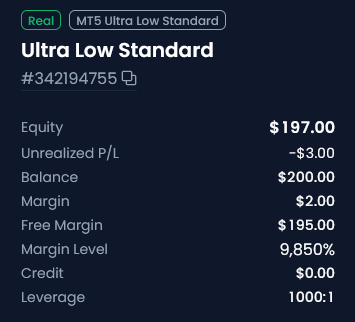
Key among them is that XM offers a single card-based layout that has a snapshot of your portfolio. This includes your equity, unrealized P/L, balance, margin, free margin, margin level, credit, and leverage.
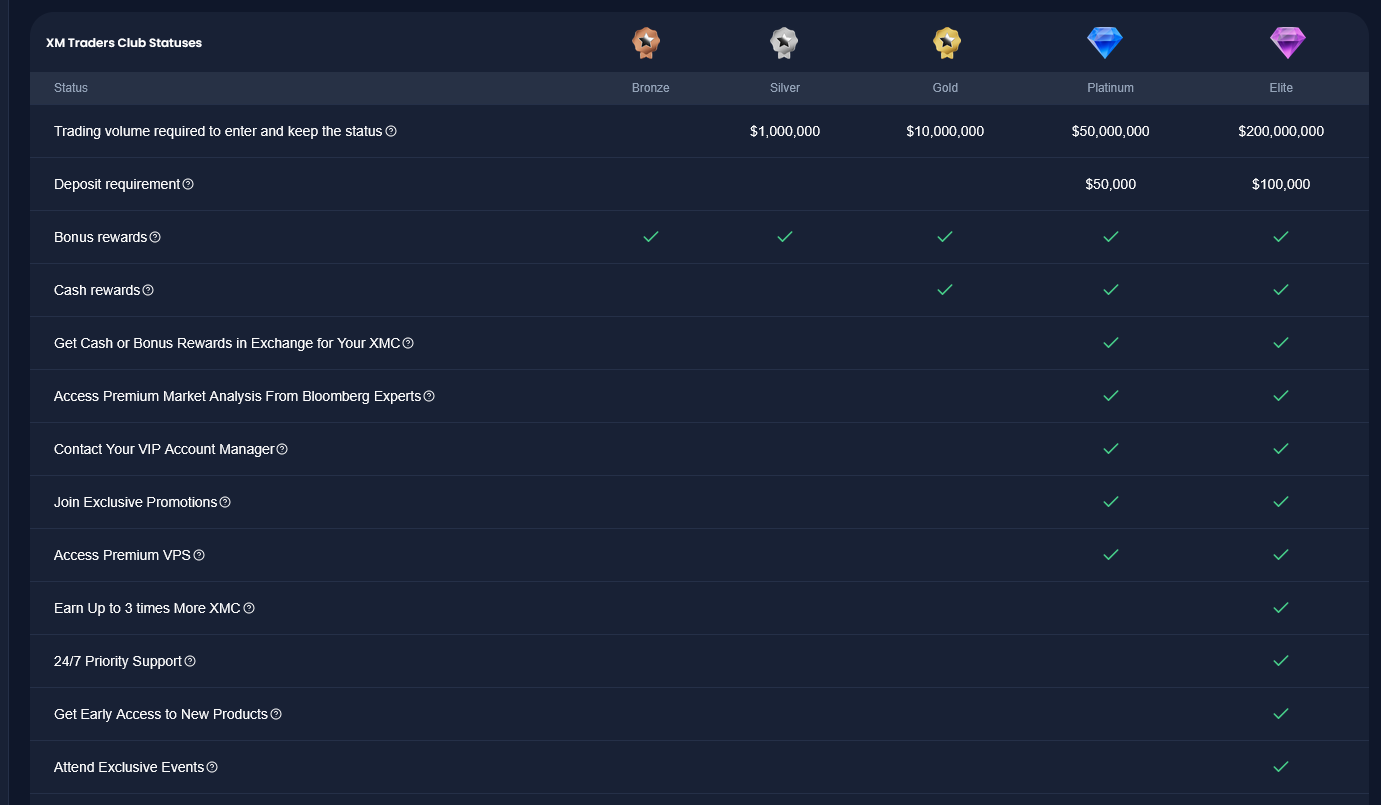
Another important feature: The XM Traders Club is like a VIP program. You begin at Bronze. As you climb the ladder (Silver, Gold, Platinum, and finally Elite), you start receiving cash rewards and other perks, such as premium market analysis from Bloomberg experts starting at Platinum. You climb the ladder through your trading volume. You can go to the “How It Works” section for the XMC Calculator, where you can input your trade size in lots and calculate what you’ll get.
Market View
The key to any forex trading platform is its market viewer. Look-wise, you have something similar to what you’d expect, just splashed with the trademark blue branding of XM’s platforms. But there are a few nifty perks here as well.

On the very left, you can see selectors like popular, forex, stocks CFDs, equity indices, commodities, crypto, etc. to narrow down your options. You can edit this list and add markets to your watchlist as well (in which case, the My Watchlist options becomes functional).
The market view is simple. But there are three buttons that make your job easier:
- Ask AI: Just imagine an AI was looking at all this. Clicking this button opens a chatbot in the sidebar. You can talk with it. Use it to analyze things, discuss strategy, or find information. Or something entirely else. It eases the job a lot.
- News & Analysis: As the name suggests, this opens a tab where you can see critical information about the market you are on. Super helpful, especially when making quick trades during peak hours.
- Insights: Could be your most powerful tool if used correctly. First, you see an AI overview, followed by much-needed breakdowns of market sentiment (buy vs. sell percentages), daily price change (lows and highs), and technical score (short-term, intermediate, long-term). At the very bottom, you will find support and resistance.
At least for beginners, this is more than enough to make informed, data-backed decisions instead of relying on what that one friend said yesterday.
XM Tools
XM offers a bunch of tools, tidily stashed away in its left sidebar. You can quickly jump into your trades, copy your trades, check competitions, or click on “More”. This More is a treasure trove.
You have access to all tools here like news, analysis, economic calendar, trading central, forex calculators, VPS, corporate events, index dividends, etc. Also, there’s a section dedicated to education including videos, guides, webinars, etc.
This tray also acts as a shortcut to core features. You can launch the deposit, withdrawal, wallet, help, chat, marketplace, and other core components of the larger XM trading platform from here.
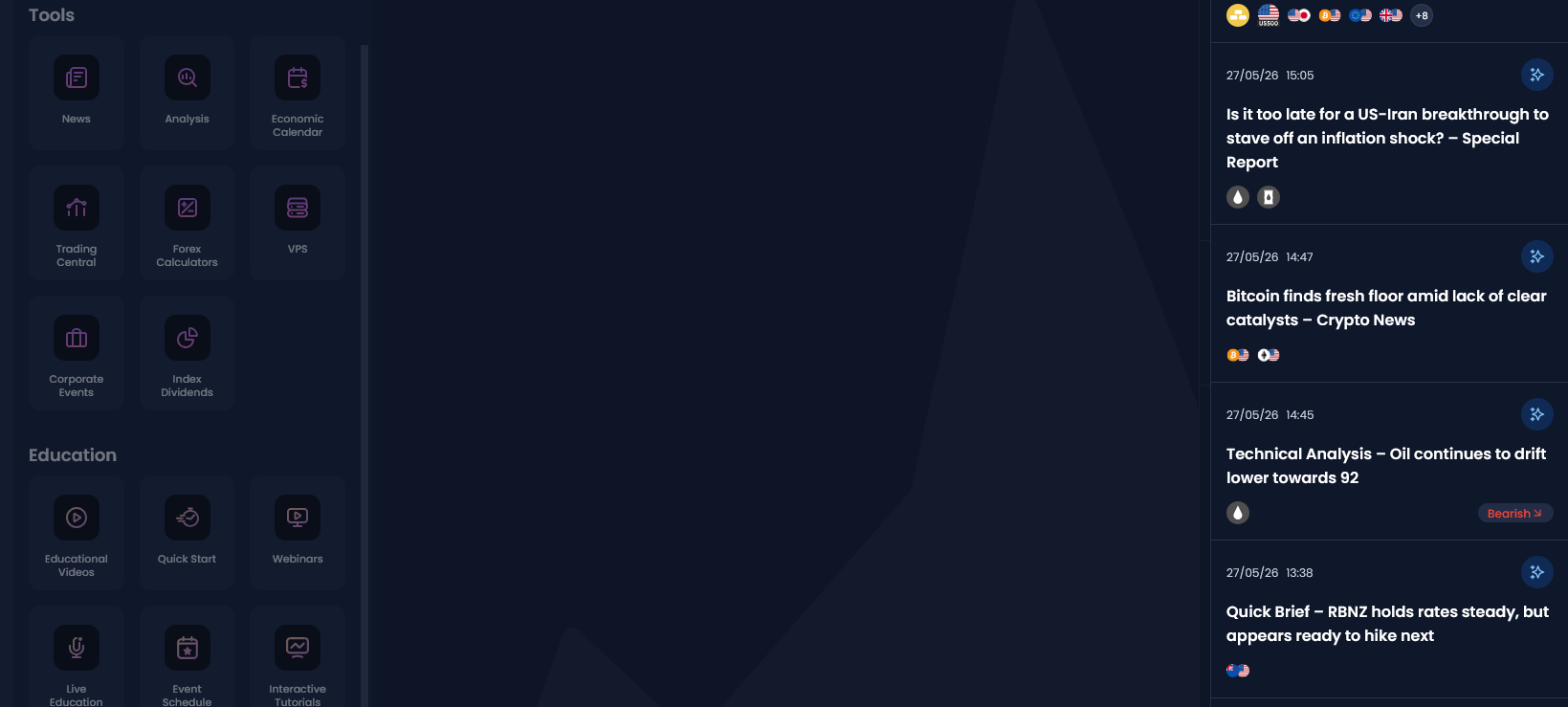
Once you get around using them, this tray is going to be extremely helpful in quickly getting to where you want.
Making Trades
There really isn’t something groundbreaking here. If you have ever made a trade before, everything should make sense. Follow these steps:
- Click on the market. Its chart will open up.
- On the right side, you can go to Sell or Buy. Let’s assume you’re buying.
- Enter quantity (currency value) or lots.
- You can also toggle “Buy When Price Is,” meaning if you have a target (which you must as a forex trader), you can have XM execute the trade automatically on your behalf. Grabbing a sandwich won’t be as punishing anymore.
- Just click on the Place Order at [value] button and your order will be placed!
You can track all your trades in the trades section or check your portfolio in the portfolio section.
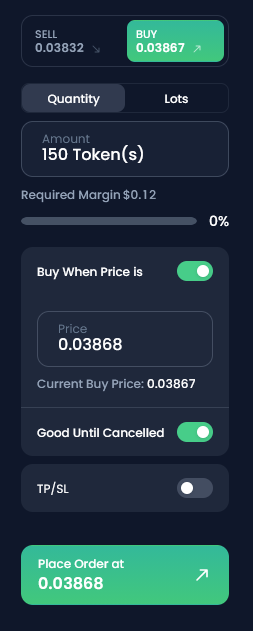
This is what it could look like if you’re trying to buy 150 tokens for ENJUSD#. If you have a target but you don’t want it to be perpetual (let’s say an event is coming soon that might affect prices negatively for you), then you can turn the “Good Until Cancelled” toggle off. This gives you two fields: the date and time until when this offer is good. At this time, the automatic order will expire.
Note: XM also offers a “One Click Order” toggle. Turning this on will allow you to make trades with no warnings and confirmations. This is a level many play at, but if you are just starting out, keeping confirmations on is totally worth it, especially when you consider the obvious risk of losing big. The added convenience of not wasting a few moments clicking through a confirmation, even during a high-voltage trading session, is simply not worth it for most forex traders when they are just getting started.
A Closer Look at XM
We know what matters to forex traders. Whether you’re a beginner or a seasoned trader with plenty of experience under the belt, there are a few areas that you’d wish to know about before you make a new account and deposit on XM.
XM Account Types
Any forex trading platform needs a solid set of accounts. XM offers a few for your convenience. Note that depending on your country, the available account types might be different. Here’s a quick breakdown:
- Demo Accounts: These are free accounts where you can practice trading. Intended mainly for beginners, even expert traders will find a good use of these accounts, as they allow you to test new trading strategies in a risk-free way using 100% free, virtual funds.
- Standard: The standard account offers a bonus when you sign-up. It has a micro account option and the max leverage is 1000:1. The stop-out level is 20% and the account has no commission. It’s not swap-free. Minimum deposit: $5.
- Ultra Low: High-volume friendly account with no bonus. It’s swap-free and has no commission. Spreads can go as low as 2.4 for gold and 0.8 for EUR/USD. Minimum deposit: $5.
- Shares: This is a special type of account limited to just shares. No bonus or micro account option, swap-free, and with commission. The minimum deposit for this is $10,000. If you want shares in a company, you can use this account type to take a stake. The maximum leverage here is 1:1 and the stop-out level is 0%.
- Zero: A Zero account comes with fixed commissions and spreads as low as 0 (such as for EUR/USD and USD/JPY). The maximum leverage on this account is up to 500:1, though EU retail clients are capped at 30:1 under ESMA rules, paired with a 50% stop-out level. It’s not swap-free, has a commission, and comes without a micro account option. The minimum deposit is $100.
- Micro: Designed for small trades, the Micro Account is ideal for traders looking to trade a minimum of 10 units. Both Standard and Zero accounts have a micro account option.
Alright, with all that out of the way, here’s some additional information:
- You cannot change an account type.
- The Standard account is the best to make use of the year-round bonuses XM gives.
- You can always open other types of accounts. XM allows up to 8 accounts.
- All account types offer negative balance protection and hedging. There’s also an option for Islamic trading.
- USD is the main currency for all accounts. Your local currency (if not USD) will be an equivalent value.
Spread/Commission
XM uses mostly spread-based pricing on Standard, Micro, and Ultra Low accounts.
- In Standard/Micro setup, you have no separate forex commission and the starting spreads are usually around 1 pip. Excellent if you prioritize simplicity at the cost of, well, trading cost.
- On Ultra Low, you have no commission and lower spreads than Standard/Micro (from 0.6 pip). This is ideal for traders who want lower costs without moving to a raw-spread commission model.
- Zero accounts offer raw/near-zero spread. Commission is commonly $3.50 per side per standard lot or $7 round-turn per $100,000 traded. Keep in mind that a 0.0 pip spread doesn’t mean free trading! The commission still has to be added to the total trade cost.
- Shares accounts use market/region-specific stock commissions. US shares, UK shares, and German shares all have different commission structures, so double-check before trading.
Platforms Covered
XM supports MT4 and MT5. There is also browser-based WebTrader access.
- MT4: The familiar forex-first platform. XM offers one-click trading, 50+ indicators/charting tools, Expert Advisors, MQL4 help guides, and proper mobile access. If you’re someone who relies on older indicators, EAs, and that classic MetaTrader workflow, then this is ideal. Reliable but not really modern.
- MT5: MT5 is way better for multi-asset trading. It also has a more modern MetaTrader setup. So, if you’re not married to the MT4 way of life, then XM allows you to do your trading on a modern interface as well. On MT5, XM has 58+ indicators, 44 analytical objects, Expert Advisors, cross-platform support, and access to the MT5 WebTrader. Anyone who wants a broader instrument set, more order types, a modern look, and newer platform features should consider MT5.
- WebTrader: Not into downloading software? XM is also available on the web. You can connect to a MT4/MT5 account from your browser with all basic functions supported: one-click orders, market orders, stop loss/order changes, and indicators. The WebTrader is very good for checking positions and even placing basic trades. But unless you're really limited (e.g., you have a shared or work machine), MT4 or MT5 direct access is remarkably better as your main setup for heavy charting and custom EA use.
- XM App & Dashboard: XM’s own interface is worth noting. The MT4/MT5/WebTrader platform access is separate. Serious MetaTrader users still prefer the MT4/MT5 desktop over the XM dashboard for custom indicators, EAs, and advanced chart layouts.
Payment Methods
As mentioned earlier, payment methods vary by country, account entity, and even your account’s current verification status. Here are the payment methods:
- Credit cards and debit cards are usually available to all except for specific situations like you cannot use credit cards if you’re in Spain.
- Bank wire and local bank transfers are also supported almost universally, and act as a backup for card/e-wallet payments.
- E-wallets such as Skrill, Neteller, Jeton, Astro Pay, Payz, MiFinity, etc. are available depending on the region.
- Local payment methods such as China UnionPay in China, PIX in Brazil, UPI in India, etc. are also available.
- Cryptocurrencies are available to all regions.
Keep in mind that XM is a regulated and reputable trading platform. They always do their due diligence in offering the fastest and most convenient payment methods in any market.
Withdrawal Speed
The minimum withdrawal is $5 for cards and e-wallets, while bank wire withdrawals have a $200 minimum.
XM is well-known as a priority withdrawal platform. All withdrawals are typically processed back to the original funding source in a specific order (cards > e-wallets > bank transfers). Profits that exceed your initial card deposits can be withdrawn via bank transfer.
Withdrawals might be subject to a processing delay. E-wallet and card processing is under 24 hours but bank wire transfers can take 2-5 working days. This can differ, of course, based on your location. Bank wire transfers with the EU are often faster but if you try to withdraw to a local UAE bank account while in Dubai, it can take a couple more days than normal.
XM also covers bank fees for international bank wire transfers if the amount is $200 or more.
According to XM’s help center: Withdrawal requests are processed instantly by our Artificial Intelligence Back Office System, based on algorithmic parameters. You’ll receive your money immediately, or on the same day your request is executed. Withdrawals via bank wire, credit or debit card usually take 2-5 business days to reach your account.
XM vs. IC Markets vs. Pepperstone vs. Exness
Reading a review focused on XM’s many features and tools might almost make you believe it’s the best. Well, as it turns out, XM is not the best “lowest spread at all costs” broker after all.
IC Markets and Pepperstone are better for serious scalpers, algo traders, and raw-spread users. Exness is better in terms of account variety, very low spreads, and high-leverage, offshore-style trading conditions.
XM’s key USP is beginner-to-intermediate usability. It offers a low minimum deposit, the familiar MetaTrader UI, education and guides, research tools, a stacked localized payment options range, and a very intuitive, non-intimidating trading dashboard.
If you’re interested in these platforms, please check their individual reviews. But I’ll take this space to map out a clear outliers among these competing platforms:
- IC Markets is excellent for raw-spread trading, scalping, EAs, and tight average EUR/USD spreads. The Raw Spread account has EUR/USD at 0.1 pips and $3.50 commission per lot per side. It also supports cTrader and TradingView on top of MT4, MT5, and WebTrader.
- Pepperstone is also great when it comes to raw-spread active trading. Its Razor account offers raw spreads from 0.0 with $3.50 commission per lot per side on margin FX. They also have a beginner-friendly Standard account with the fees rolled into the spread and no FX commission. More importantly, Pepperstone lists 1,444 instruments across Standard and Razor CFD accounts including forex, indices, commodities, shares, and ETFs.
- Exness is better for traders who want more account variety and aggressive trading conditions. The Standard account lists spreads from 0.2 pips, no commission, minimum 0.01 lot, and market execution. The Pro account lists spreads from 0.01 pips, and the Zero and Raw Spread accounts start from 0 pips with commissions.
Tools of the Trade, Literally
Ready to supercharge your game? There are a few tools that offer dedicated, specialized support for forex traders that the XM dashboard itself might not offer.
ForexVue’s tools offer you the ability to be precise and make even better decisions. Once you see them in action and reap the benefits, you will never go back! Here are four key tools that can be used to trade on XM:
1. Pip Calculator
It tells you how much money you gain or lose when the price moves by 1 pip. ForexVue’s pip calculator uses the currency pair, account currency, trade size, and exchange rate to show the value of each pip. It also shows examples for 10, 50, and 100 pips. For a beginner with $200, the useful area is usually 0.01 lots or smaller. Our tool also notes that micro lots are around $0.10 per pip on USD-quoted pairs like EUR/USD, GBP/USD, AUD/USD, and NZD/USD.
2. Position Size Calculator
It calculates the correct lot size based on your account balance, risk percentage, stop-loss distance, and currency pair. It’s a way to avoid risking more than your chosen limit on a single trade. The 1% rule is conservative and recommended for beginners, while 2% is more common among experienced retail traders. As an example, at 1% risk, your stop loss can be 20 pips and 0.01 lot. The approx loss if SL hits with a $200 balance would be around $2.
Launch Position Size Calculator →
3. Margin Calculator
It shows how much money your broker locks as margin/collateral to open a trade. ForexVue’s margin calculator uses the currency pair, trade size, leverage, exchange rate, account currency, and optional balance to show required margin, position value, margin percentage, and free margin. On XM, we saw they have a 1000:1 leverage.
The margin may look tiny, but the trade’s profit/loss still moves based on the full position size. Leverage changes how much collateral is locked, not how much the position gains or loses per pip.
This is where we come in. No matter how enticing a trade is on your XM dashboard, you need the Margin Calculator to make better decisions. A 1.00 lot with a $108,500 position value at 1000:1 margin (XM’s margin) sits at $108.5 at a pip value of around $10/pip.
With $200, a 1.00 lot trade may look “possible” because margin is only around $108 at 1000:1, but a 20-pip move against you would be around -$200. That is basically account suicide with extra steps. Remember, high leverage lets traders open very large positions with small margin, but even a small pip move can wipe out the account if the position is too large.
4. Profit/Loss Calculator
It estimates your trade result before entering. You enter the currency pair, buy/sell direction, trade size, entry price, exit price, stop loss, and spread. It then shows pips gained/lost, gross P/L, net P/L, spread cost, and risk-reward ratio.
Basically, our P/L calculator lets you test a trade idea before you risk actual money. Critical for beginners. Let’s take an example with 0.01 lot EUR/USD.
- +20 pips: +~$2
- -20 pips: -~$2
- +50 pips: +~$5
- -50 pips: -~$5
Now, let’s take an example with 0.10 lot EUR/USD, while keeping the pip movement the same, shall we?
- +20 pips: +~$20
- -20 pips: -~$20
- +50 pips: +~$50
- -50 pips: -~$50
You see what just happened here? This is why many beginners get wrecked. Exciting when green, horror flick when red. You almost feel as if you have no control.
Also, this tool helps with risk-reward. If you risk 50 pips to make 70 pips, the risk-reward is 1:1.4. That’s critical info calculated for you in a moment before you execute that trade on XM. Another point is that trades below 1:1 are mathematically weak because you are risking more than you stand to gain.
Launch Profit & Loss Calculator →
A few simple tools from ForexVue can be insanely helpful in these situations.
Ready to try XM Group?
Risk warning: 75.33% of retail CFD accounts lose money when trading with this provider.
VisitThis review is based on hands-on use of the XM platform plus publicly available data from XM Group's website and regulatory filings. Trading costs, spreads, leverage, and account conditions can change at any time and vary by entity and region. We encourage traders to open a demo account and verify current terms directly with XM before committing real funds.
Sources & Regulatory References
Related comparisons
This page contains affiliate links. If you open an account through a link on this page, we may receive a commission at no extra cost to you. This does not affect our rankings or reviews. Learn more